Applying for the Annapurna Bhandar Yojana is a crucial step for elderly individuals and low-income families seeking subsidised food grains. After submitting the application, the waiting period can feel uncertain.
If you have applied for West Bengal’s Annapurna Bhandar Yojana (which provides monthly financial assistance of ₹3,000 to women), you can check your application status online using your application ID, registered mobile number, or Aadhaar details. Instead of making repeated visits to government offices, you can view the status of your application directly from your phone or computer.
This guide provides a clear, step-by-step method to check your Annapurna Bhandar status using your application ID, along with practical solutions for common issues.
What Is Annapurna Bhandar Yojana?
The Annapurna Bhandar Scheme is a West Bengal government initiative that provides ₹3,000 per month to eligible women through Direct Benefit Transfer (DBT) into their bank accounts. It replaces the earlier Lakshmi Bhandar scheme and officially started around June 2026.
What You Need Before Checking Your Status
To check your status quickly, gather these details before opening the website:
- Application ID or Acknowledgement Number: Found on the receipt given to you at the time of submission.
- Registered Mobile Number: Required in case the portal sends a One-Time Password (OTP) for verification.
- Backup Identification: Keep your Aadhaar number or Ration Card number handy in case you misplace the Application ID.
Official Government Portal Links for Status Check
Use only official government portals to check your status:
- Social Registry / Social Security Portal (West Bengal):
https://socialregistry.wb.gov.in
or
https://socialsecurity.wb.gov.in/login
Some portals also show a direct “Track Applicant Status” button on the homepage.
Note: While many users log in using District + Registered Mobile Number + OTP, the system also supports Application ID in several interfaces.
Step-by-Step Process to Check Annapurna Bhandar Status Online
Follow these steps to check your Annapurna Bhandar application status online using your Application ID.
Step 1: Visit the Official Portal
Open your browser and go to: https://socialregistry.wb.gov.in (or socialsecurity.wb.gov.in/login)
Step 2: Click on “Track Applicant Status” Citizen / Family Login
On the homepage, look for and click on: Citizen/Family Login. button.
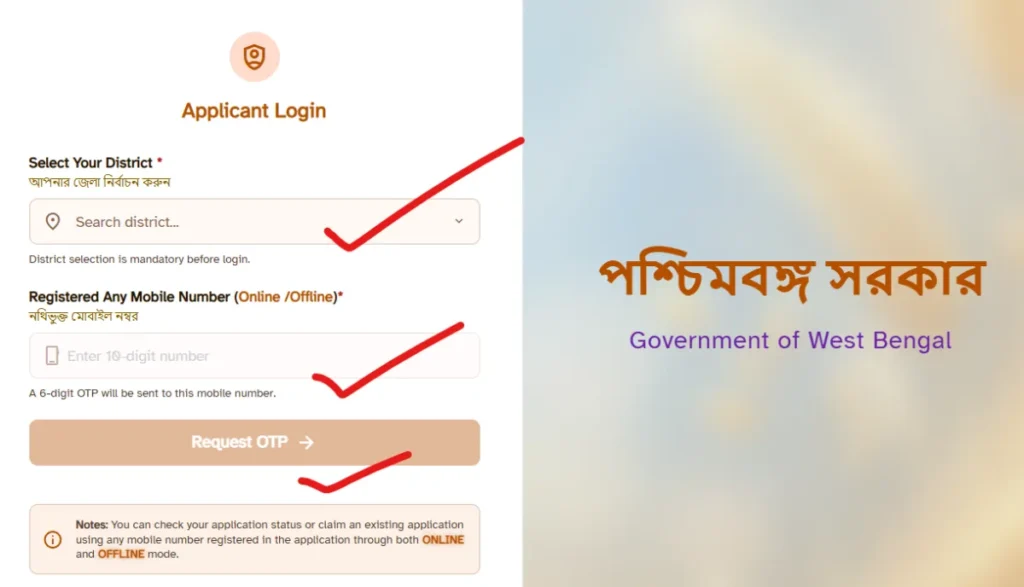
Step 3: Enter Your Details
Fill in the required fields:
- Select Your District *
- Registered Any Mobile Number (Online /Offline)*
- A 6-digit OTP will be sent to this mobile number.
- Click on Request OTP.
Step 5: OTP Verification
A 6-digit OTP will be sent to your registered mobile number.
- Enter the OTP
- Click Submit / Verify
Step 6: View Your Application Status
After logging in, your Application Status will appear, such as:
- Approved / Application Approved
- Pending / Under Verification / Under Enquiry
- Rejected
- Not Found / Migrated Out (in some cases)
From this page, you can also file grievances or objections if your status is stuck.
How to Check Status Without an Application ID
Losing your acknowledgement receipt is common. If you do not have your Application ID, most state portals offer alternative search methods:
- Search by Aadhaar Number: Enter your 12-digit Aadhaar number linked to the application.
- Search by Ration Card: Use your existing family ration card number.
- Search by Mobile Number: Some state systems allow you to retrieve your status using the phone number provided during registration.
Understanding Your Application Status Results
When the portal displays your result, it will typically show one of the following statuses:
Approved / Application Approved: Your application has been accepted. The ₹3,000 monthly instalment should be credited to your bank account via DBT.
Pending / Under Verification / Under Enquiry: Your application is under review. Document verification or field enquiry may still be in progress.
Rejected: Your application has been declined. Check the portal or contact your local office for the reason.
Not Found / Migrated Out: Your record is not found, or you appear to have moved to another district/area. File a grievance or visit your local office.
Offline Methods to Check Annapurna Bhandar Status
Government websites occasionally face heavy traffic or technical maintenance. If the online portal is not working, you have reliable offline options:
- Visit the Local Food Supply Office: Take your original application receipt, Aadhaar card, and ration card to the nearest Tehsil office or District Food and Supplies Office. The staff can check the internal database and give you a direct update.
- Ask Your Fair Price Shop Dealer: Local ration shop owners receive updated beneficiary lists regularly. They can often tell you if your name has been approved for the Annapurna Bhandar quota.
- Call the State Helpline: Most food departments operate a toll-free grievance helpline. Provide your details to the customer care executive to get a status update over the phone.
Payment Not Received? Here’s What to Do
If your status shows Approved but you haven’t received the money:
- Check Your Bank Account: Look for a ₹3,000 credit in your bank statement or passbook.
- Verify DBT and Aadhaar Seeding: Ensure your bank account is linked with Aadhaar and active for DBT transfers.
- File a Grievance on the Portal: Use the Claim / Objection option in the Citizen Portal.
- Visit Your Local Office: Go to your Block/Municipality Office with your application number and registered mobile number for inquiry.
Frequently Asked Questions (FAQs)
Is there a fee to check the Annapurna Bhandar status online?
No, checking your application status on any official government portal is completely free. Do not pay anyone who claims they can expedite your status check for a fee.
How long does the Annapurna Bhandar approval process take?
Although this may vary depending on the workload at the state and district levels, most applications are processed within 15 to 30 days of submission, provided all documents are in order.
Can I check the status for an elderly parent using their Application ID?
Yes, you can check the status of your elderly parent’s application using their application ID and necessary additional information (such as their registered mobile number for OTP verification).
What should I do if my application is rejected?
Check the reason for the rejection on the portal. If it occurred due to incomplete documents, you can usually reapply with the correct documents within the stipulated timeframe or appeal to the District Supply Officer.
Conclusion
Tracking your Annapurna Bhandar application status using your application ID takes the guesswork out of the waiting period. By regularly checking the official state portal and keeping your acknowledgment receipt safe, you stay fully informed about your food grain benefits. If the website faces technical issues, local food offices and state helplines are always available to help. Stay proactive, keep your documents organised, and you will receive your updates without any hassle.